
KrabDroid 3.0
Smart railway measurement in your hands
The latest-generation Android measurement software for the KRAB family — track geometry, rail profiles and switch inspection in real time
Standards Compliance
✓ EN 13848
Why Choose KrabDroid 3.0?
Immediate Results
Live monitoring of track geometry and rail profile parameters directly on your Android device, with numerical values and dynamic graphs side by side.
Layouts That Fit the Job
Multiple screen layouts, full-screen mode and night mode. Adjustable limits and zoom keep the important signals readable in any conditions.
Switches Included
Automatic Switch Inspection (ASI) guides the operator through the switch, so measuring a switch is as routine as measuring plain track.
Documented in the Field
Point and section events, custom event categories, photo documentation and kilometer corrections — all captured while you are still on site.
See It in Action
Screenshots from the application
KrabDroid 3.0 during a track geometry run: live values and graphs, a platform marked as a section event on the way
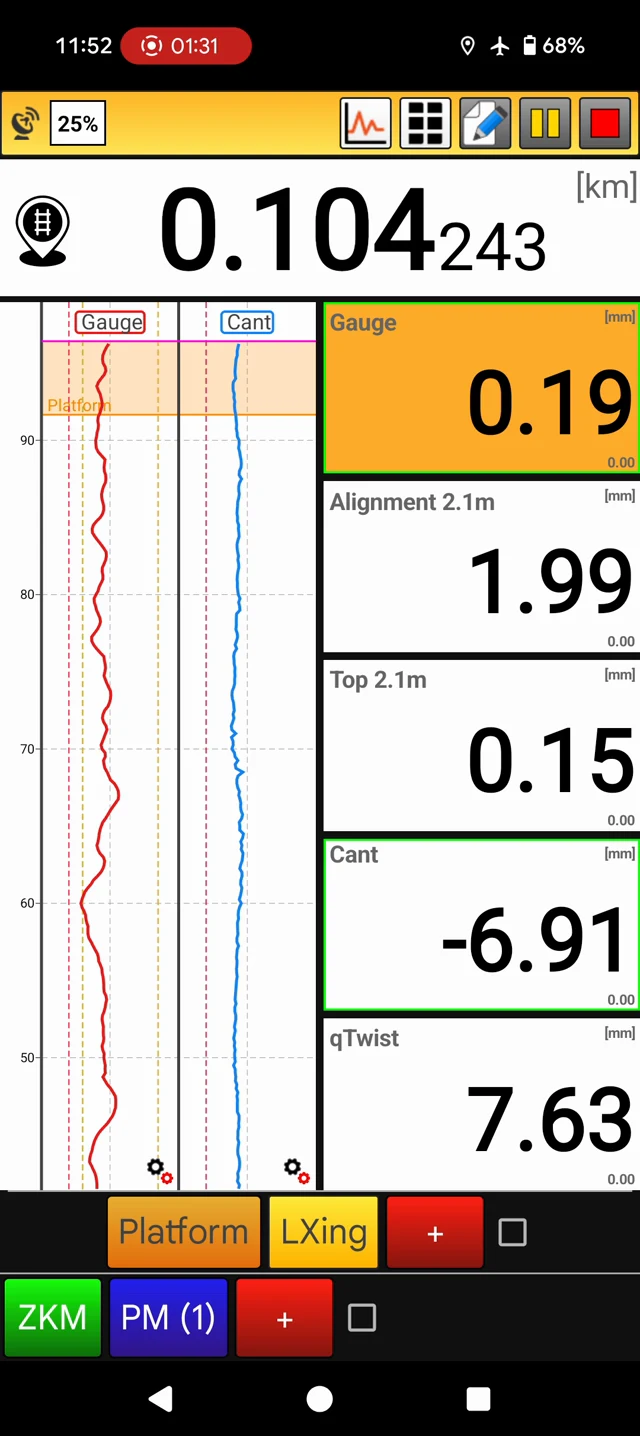
Measuring screen: chainage, live gauge, alignment, top, cant and twist next to the running graphs
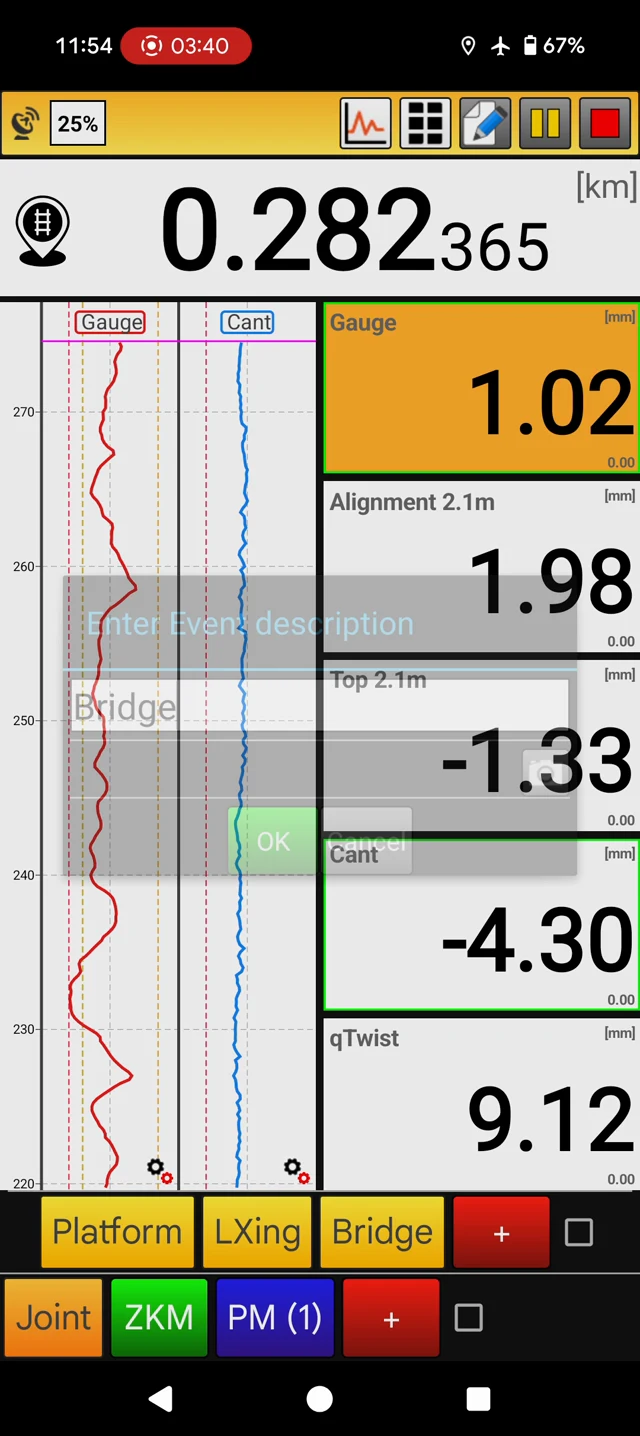
Events on the way: a bridge is entered with one tap and stored with the measurement
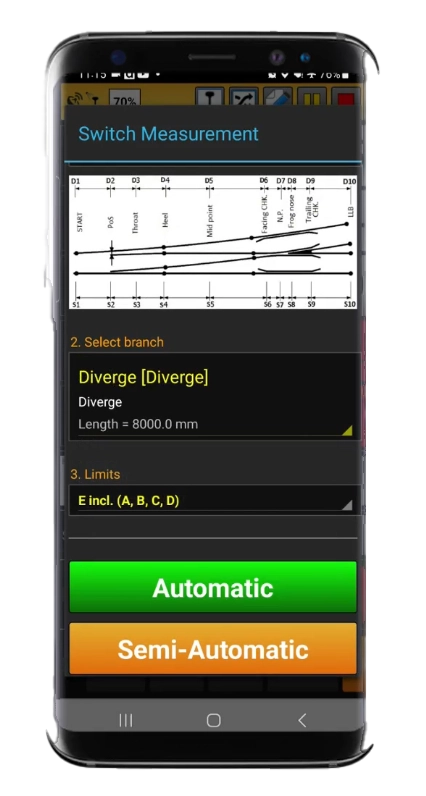
ASI switch measurement setup: switch diagram, branch selection, limits and automatic or semi-automatic mode
Key Features
Real-Time Measurement Display
Track geometry and rail profile parameters visualized live during the run
Multiple Screen Layouts
Switchable layouts, full-screen and night mode for readable data in any light
Dynamic Graphs and Trends
Signal trends with adjustable limits and zoom for detailed inspection
Automatic Switch Inspection
Guided ASI switch measurement with the KZV switch type database
Rail Profile Measurement
Rail profile acquisition and on-screen visualization during inspection
Point and Section Events
Insert point or section events with custom categories and photo documentation
Kilometer Corrections
Correct kilometrage in the field so measurements match the track’s actual referencing
Data for Office Evaluation
Measurements stored on the device in .kzv format for evaluation in KRAB 11
Technical Specifications
| Platform | Android smartphone or tablet |
|---|---|
| Connectivity | Bluetooth (measuring trolley), WiFi, Ethernet cable |
| Measured Data | Track geometry, switches, rail profiles |
| Data Format | .kzv (evaluated in KRAB 11) |
| Standards | EN 13848 |
Compatible Hardware
This software works with the following KZV products:
Automatic Switch Inspection
ASI covers the whole switch and crossing (turnout), from the switch blades to the frog. Conventional switch measurement means stopping at every switch and working through it point by point. With ASI the trolley keeps rolling: the operator selects the switch from the database on the phone or tablet, marks its start or end with a single tap, and the configured points are located and captured on the way through, in the same .kzv file as the plain track.
The Switch Database
The database is prepared in KRAB 11 on Windows. It holds the switch types — length, layout, measurement points and the quantities measured at each point — and the switches of the network, each with its type, number and GPS position. It is loaded into KrabDroid 3.0 on any number of devices. A switch type that is not yet in the database can be added in the field and refined later in the office.
In the Field
The Android device is paired with the KRAB trolley, and the project and the track referencing data are loaded before the run. KrabDroid 3.0 then records track geometry, rail profiles and GPS position continuously while the trolley is pushed along the track. Events, photographs, custom event categories and kilometer corrections are entered without interrupting the run.
From Measurement to Report
- Measure: KrabDroid 3.0 on Android with a KRAB trolley
- Inspect switches: ASI in the same run and in the same file as the plain track
- Evaluate: KRAB 11 on Windows — local defects, section evaluation, rail profiles and switches
- Report: tables, graphs and GPS-referenced defect lists
Videos
ASI - Automatic Switch Inspection
ASI running an automated geometry and condition check on a switch. Automating the inspection catches faults early and keeps switch maintenance predictable.
Switch Measurement with Our Trolleys Training
How to set up, run and evaluate a measurement inside a switch: geometry and rail profiles in complex switch areas, collected without disrupting traffic and processed into a maintenance report.
Measuring Through a Frog Training
The correct procedure for approaching and crossing a frog with a KRAB trolley, so that the measurement stays uninterrupted and the operator stays safe.
Ready to Get Started?
Contact us for detailed information, pricing, training, and technical support